Your Listing Has No Buy Box. Here's Why.

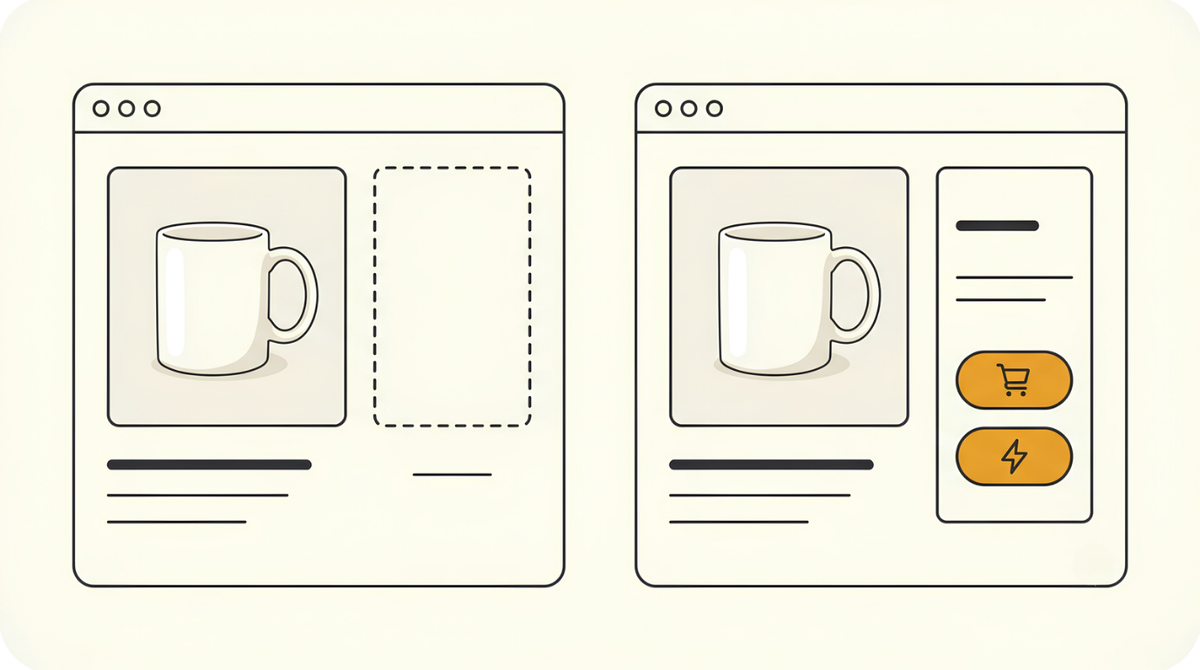
You open your own listing, the one nobody else is selling on, and the Add to Cart button isn't there. Instead there's a grey link that says see all buying options.
Nothing is broken.
Amazon just hasn't decided it trusts you to deliver yet. That decision is what the Buy Box actually is, and if you're selling FBM it doesn't come free. You earn it, and the way you earn it isn't what you'd guess. It has almost nothing to do with the listing you're staring at.
What the Buy Box actually is
It's the box on the right of an Amazon product page holding the price, the Add to Cart button, and the Buy Now button. Whoever holds it makes the sale when a shopper taps that button. Amazon renamed it the Featured Offer a while back, though nearly everyone still calls it the Buy Box.
The usual explanation is that many sellers can sit on one product page, and Amazon picks one of them to be the default. That's true. It's also the reason people get confused when they're the only seller on a page and still don't have it.
Being alone on the listing doesn't win it. The box isn't given to whoever is standing there by themselves. It's given to a seller Amazon considers safe to send a customer to. If nobody on that page clears the bar, nobody gets it, and the page just shows a list of offers instead.
Buy Box or Featured Offer? Which name is right
Amazon officially retired "Buy Box" and calls it the Featured Offer across Seller Central and its help pages. Your listing status will read "Featured Offer eligible: No", not "Buy Box eligible: No", so that's the phrase to search for when you're digging through your own account.
Sellers kept using the old name anyway, so guides, forums and tools use both interchangeably. Same thing, two labels.
Why it costs you sales
You can still sell without it. Orders come through. That part surprises people who assume no Buy Box means a dead listing.
What changes is how hard buying is.
With the box, it's one tap. Add to Cart, done. Without it, the shopper has to click through to the offers list, read a small table of sellers and prices, pick you, then add to cart. Three extra steps and a pause in the middle where they think about it.
Nobody abandons a purchase because they hate your product. They abandon it because it got slightly harder.
That's what the missing box really is. Not a block, just friction. And friction shows up in your numbers as a lower conversion rate, the share of people who land on your listing and actually buy.
The Buy Box doesn't decide whether you can sell. It decides how much work a buyer has to do to buy from you.
Why FBM makes you work for it
On FBA, eligibility is close to automatic. You ship your stock into Amazon's warehouse and Amazon handles the picking, packing, and delivery from there. When Amazon asks whether this seller can be trusted to get the parcel to the customer on time, the honest answer is that Amazon is doing it. So it trusts itself.
FBM is the other way round. Fulfilled by Merchant means you ship it, or in print on demand, your supplier ships it. Amazon has no window into whether that parcel actually leaves, actually moves, and actually lands on the right doorstep by the promised date.
So it waits and watches instead.
Amazon isn't judging your product. It's judging whether you'll deliver.
Which is why a brand-new FBM account has no Buy Box on anything. There's no history to look at. That isn't a penalty, and it isn't something you did wrong in the listing. It's just an empty file.
So why does FBA get it almost immediately?
Because the risk Amazon is pricing in has already been removed. Your stock is sitting in an Amazon warehouse, Amazon's staff pick and pack it, and Amazon's delivery network moves it. Late dispatch, bad tracking and undelivered parcels are all outcomes Amazon controls, so there's nothing left to prove.
It's worth being clear that this isn't Amazon preferring FBA sellers as people. It's that FBA hands the risky part of the job back to Amazon, and FBM doesn't.
How you actually win it
You make sales in that category. That's the whole mechanism.
Not sales on the specific product that's missing its box. Not a title rewrite, not a price drop, not a support ticket. Sales, in the category you're listing in.
It's not per product. It's per category.
Sell kitchenware, and every kitchenware order you take counts toward the same pot. Sell shirts, and every apparel order feeds the apparel pot. The individual product doesn't matter. This is a change from how it used to work, and it's why old advice about grinding out sales on one specific ASIN sends people down the wrong road.
There's no published number to hit. Mine flipped at somewhere around twenty orders in the category. Yours could be twelve or fifty, and Amazon has never said, so treat any exact figure you read as a guess.
What I can tell you is what it looks like when it happens.
💡 All at once. Eligibility isn't granted listing by listing. The moment your category history clears the bar, every product you hold in that category becomes eligible on the same day, including ones that have never sold a single unit.
I didn't touch a single listing. One day the box wasn't there, and then it was, on everything I had in that category at once. No application, no request, no waiting on a reply.
Sales open the door. Metrics keep it open.
Getting eligible is one thing. Staying eligible is a separate job, and it's the part that quietly takes it away again from sellers who never work out why.
Amazon is measuring whether you're a safe bet on four things:
- Late shipments. Confirm and dispatch inside the handling time you promised, every time.
- Valid tracking. Every order needs a real tracking number that Amazon can follow and confirm as delivered. A number that never scans counts against you.
- Order defects. Negative feedback, A-to-Z claims, and chargebacks all land here. Keep this near zero.
- Policy violations. Anything flagged on your account works against you, even when it has nothing to do with shipping.
There's a fifth thing that isn't a metric but decides several of them for you, and that's who carries the parcel. A cheap service that ships on time but arrives late still burns you, because Amazon scores the delivery, not the dispatch. If you're on print on demand, that's your supplier's shipping choice, so it's worth knowing what they actually use before you scale on top of it.
The actual numbers Amazon holds you to
Order defect rate
Under 1%. Combines negative feedback, A-to-Z Guarantee claims and chargebacks.
Late shipment rate
Under 4%. Orders confirmed as shipped after the handling time you set.
Valid tracking rate
95% or higher. Tracking numbers that Amazon can actually verify with the carrier.
On-time delivery rate
90% or higher. The share of orders that actually reach the buyer by the promised date.
Pre-fulfilment cancel rate
Under 2.5%. Orders you cancel after the buyer has paid.
All five live in Seller Central under Performance, Account Health. Worth checking before you scale, not after something slips.
Getting there faster
Nothing shortcuts the sales requirement. You can't buy the box, you can't ask for it, and there's no setting that turns it on. So the only lever left is giving yourself more chances at a sale.
That means listing more.
A missing Buy Box lowers your conversion rate. It doesn't zero it. So two hundred listings with friction still beat twenty listings with friction, and the maths gets you to the threshold a lot faster. This is the same reason breadth works in the first place, only now it's doing a second job for you.
The other lever is traffic you bring yourself. Social posts, a community you're already part of, anywhere you can genuinely point people at a product. A buyer you send in converts the same as a buyer Amazon sends, and the order counts the same toward your category history. It's slow and it's manual, but early on it's the one input you fully control.
Both of these are the same move in different clothes. More shots on goal.
There's no trick hiding behind this. Keep listing, keep your shipping clean, and one morning you'll open a product page and the box will just be sitting there, on all of them.
Good luck out there,
Nick T